Jev vs. Laya: Which AI Decision Model Should You Choose?
Choose between a hosted decision API and a local model you operate, then test the choice on the work you actually need done.
In this story
Sources checked September 21, 2026, Pacific time. This comparison combines documentation with a small local Laya smoke test on authored synthetic cases. We did not call the hosted Jev API or run a controlled head-to-head benchmark.
Start with Jev if you want a hosted service and your inputs fit its documented API. Start with Laya if running inference on your own infrastructure or adapting the weights is a requirement, and you can take on the deployment work. Those are recommendations about where to begin evaluating. Neither establishes which model will make better decisions on your tickets.
Imagine the same issue arriving in both systems: “The CSV export button does nothing.” You want a category, a judgment about missing reproduction details, and a suggestion for the review queue. A usable answer must preserve what the report says, respect your category definitions and arrive within your application's time budget. That is the comparison worth making.
The differences that should drive your choice
Both products expose typed decisions: choice for selecting an option, score for an ordered rating and noul for a yes/no probability. These can feed application logic without asking a chatbot to write and format a response. A correctly shaped answer can still be wrong. TypeSafe API, Laya model card.
| Your constraint | Jev (jev-1.13.0) | Laya |
|---|---|---|
| Where inference runs | TypeSafe's hosted API | Your chosen local machine or server |
| What you must arrange | Account access, credentials and an HTTP client | Python environment, model files, compatible runtime and enough memory |
| Larger inputs | Documented 64k-token request budget, with a separate 32k limit for state plus the longest question | Much smaller default per-question budgets; inspect the selected checkpoint and preprocessing |
| Many candidate labels | Up to 255 options per Choice | Options compete for a limited prompt budget; the publisher recommends fewer than about 20 options at default settings |
| Domain adaptation | Change the supplied state, instructions and criteria | Change those inputs; you can also fine-tune an appropriate checkpoint |
| Cost to operate | Listed input-token charge, plus your integration costs | Compute, memory, storage and operating time; downloadable weights do not make those free |
The Jev limits and customization details come from its model reference and API contract. Laya's repository documents the local runtime and tuning workflow; its benchmark limitations explain the option-budget constraint.
With Laya, name the checkpoint before discussing results
“Laya” refers to a family. The root checkpoint is aimed at English, a multilingual checkpoint serves other languages, and a separate checkpoint is fine-tuned for the typed-decisions benchmark workflows. Its router can choose a checkpoint for a request. Record what it actually selected rather than reporting every result under one model name. Laya family and router.
This matters because the publisher reports substantially different results for the base and fine-tuned versions. A result from the typed-decisions checkpoint is not evidence that the root English model will reproduce it on a new issue-triage task. The fine-tuned model card identifies that specialization. Start with the language and task you have, then evaluate that particular artifact.
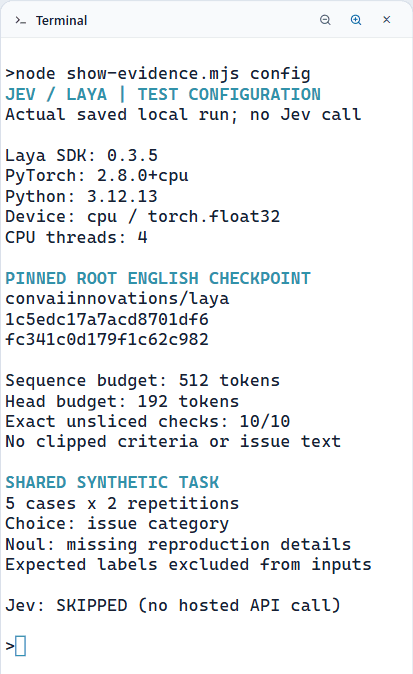
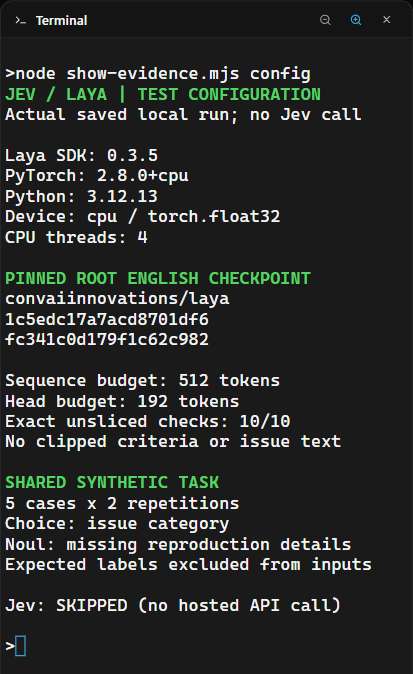
There is a second trap: a model's architectural capacity is not the amount of text your current configuration uses. The pinned English configuration sets a 512-token sequence budget and a 192-token question/options budget. The bundled multilingual configuration uses 1,024 and 256 respectively. The remaining space must hold the state, including formatting overhead. Long descriptions and large option sets consume that budget quickly. English configuration, multilingual configuration.
For a short report with four categories, this is a manageable constraint to investigate. For a long incident history and 80 possible queues, I would evaluate Jev first or redesign the task into smaller decisions. That is an inference from the documented budgets, not a claim that Jev has won an 80-label test. A larger accepted input also does not guarantee better reasoning: TypeSafe explicitly warns that irrelevant context can reduce accuracy. Jev limitations.
Local control comes with a runtime to manage
Laya's package requires Python 3.10 or newer and depends on PyTorch, Transformers and model-loading libraries. The inspected runtime supports CPU execution and accelerator selection, with CPU fallbacks in some failure cases. Log the device actually used; a requested GPU is not proof that inference stayed on it. Package requirements, runtime source.
Check available memory after loading the checkpoint, then measure your intended batch size. Model-file size alone is not a RAM or GPU-memory requirement: loading, intermediate computations and additional resident checkpoints need room too. Avoid choosing hardware from a download-size label.
Jev moves that model-serving work to TypeSafe. You still need working account access, network connectivity and error handling. The API documents authentication, rate-limit and overload failures. Confirm access before planning a launch around it. TypeSafe API errors.
What “local” means for privacy
Running Laya on infrastructure you control can keep inference inputs there. That does not automatically cover the surrounding workflow. A cloud coding agent reviewing a private ticket, a remote log collector or a hosted demo introduces another data path. Use synthetic tickets while setting up the comparison, and decide separately where real inputs may go.
TypeSafe says it does not train on customer data and offers zero data retention for enterprise customers. The latter is a separate offering, not a retention guarantee to assume for every account. Check the terms applicable to your account. TypeSafe data-handling documents.
Why the benchmark tables do not settle this
Laya's published comparison explicitly says its Jev figures come from third parties and that prompts and sample sizes differ. Its own checkpoint comparisons can be informative, but that does not turn the Jev column into a controlled head-to-head test. We would not use those figures to claim that Laya is a particular multiple faster or more accurate than Jev. Benchmark methods and limitations.
For speed, record the time the application actually waits: input preparation, local prediction or network request, and response validation. Separate first-load time from repeated predictions after loading. Keep the hardware, batch size, input lengths and number of repetitions with the result. Comparing a warm GPU forward pass with an end-to-end API request answers a different question from comparing two complete application paths.
For cost, TypeSafe currently lists Jev at $0.042 per million input tokens, with output tokens free. Laya's weights are listed under Apache 2.0, but self-hosting still consumes resources and staff time. Measure total cost for your expected workload before calling either cheaper. Jev pricing, Laya license.
Confidence needs its own evaluation
A model can be confidently wrong. Laya's multilingual card warns about overconfidence and recommends fitting calibration on representative held-out data. Calibration asks whether predicted probabilities line up with observed outcomes; it does not fix a model that routinely chooses the wrong category. Multilingual calibration limits.
TypeSafe's Choice and Score confidence values summarize the returned probability distribution. Noul does not have a separate confidence field. Laya's inspected implementation does return an additional Noul confidence value. Do not copy a threshold between providers just because fields have familiar names. TypeSafe confidence, Laya response implementation.
What our local Laya smoke test showed
We ran the root English checkpoint on five authored issue reports, twice each, using Laya 0.3.5 on Windows with Python 3.12, CPU PyTorch 2.8.0 and four processing threads. The model revision was pinned to 1c5edc17a7acd8701df6fc341c0d179f1c62c982. Expected labels stayed outside the model input. Checks found no additional truncation from the configured sequence budgets in these cases.
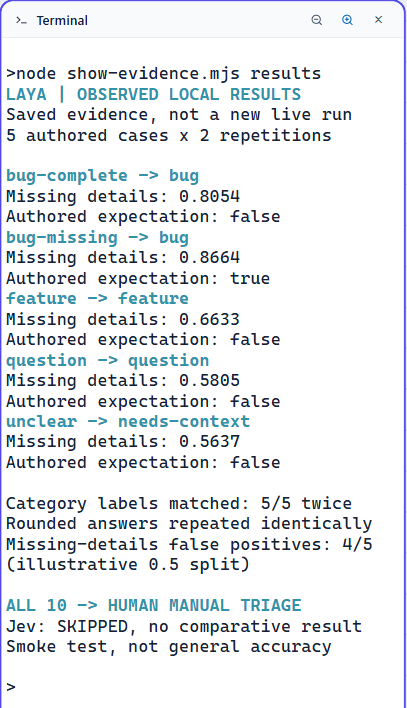
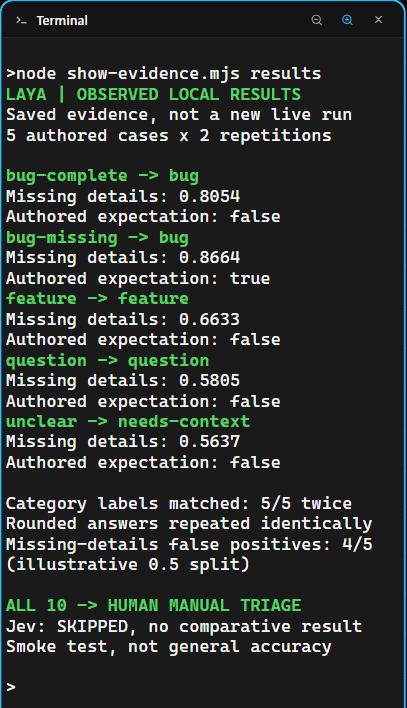
The category choices matched all five authored labels in both repetitions. The separate missing-reproduction question was less useful:
| Authored report | Expected missing information? | Laya's probability of yes |
|---|---|---|
| Bug report with steps, expected and actual behavior, and environment supplied | No | 0.8054 |
| Bug report with steps and environment missing | Yes | 0.8664 |
The other three cases also exceeded 0.5 despite an expected "no." Getting the category right did not make the second judgment reliable. These were five simple examples with one rubric, not a representative accuracy test; repeating them did not create five additional independent cases.
The illustrative policy kept all ten outputs in manual-triage, with human review required. Separately, eight adapter tests passed; their Jev transport checks used mocks. There was no hosted Jev result to compare.
This run supports a modest conclusion: the local inference path worked, and inspecting each question exposed a problem that a category-only check would have missed. Before using this rubric on real issues, we would investigate those false positives and evaluate revised criteria on fresh cases.
Compare one useful workflow in AgentGrid
Use the issue-triage scenario from our Jev getting-started guide. Its downloadable example separates question criteria from the code that suggests a review queue. The published run used synthetic responses; it is a starting point for integration work, not a Jev accuracy result.
Open a separate comparison project in AgentGrid. Keep the shared cases, provider adapters, coding-agent review and terminal results together. Jev and Laya are the decision components called by your scripts; this workflow does not require either to be a native AgentGrid coding-agent harness.
Before executing either model, write the expected outcome for each case:
| Case to include | What you are checking |
|---|---|
| A clear feature request | New functionality stays distinct from a reported defect |
| A defect report with missing steps | Missing context triggers review rather than an invented explanation |
| A question about existing behavior | Help requests do not become bug reports by default |
| A report with competing intentions | The system can defer an ambiguous case |
| A long report or expanded label set | Relevant evidence and label descriptions survive preprocessing |
Use separate examples for tuning criteria or calibration and for the final evaluation. Preserve the intended meaning across adapters, and record any difference in the actual serialized requests. Identical source JSON is not enough if one runtime truncates it or interprets fields differently.
This is a prompt you can give the coding agent to begin the work:
Build a reviewable Jev/Laya issue-triage comparison in this project.
Read project instructions first. Use synthetic cases with expected
categories and human-review actions recorded before model execution.

Keep provider adapters separate. Record package/model/checkpoint versions,
actual device, input limits and execution mode with every result.
Check that each adapter preserves the intended criteria and input text.
Show skipped, fixture, local-inference and hosted-API runs distinctly.

Start with offline adapter and policy tests. Do not read credentials,
download weights, call hosted inference or modify real issues yet.
Report what passed, what remains untested and the resources needed next.
That prompt is a suggested next step; it was not used to produce the smoke-test results above. When you add real model runs, retain the raw outputs and failures. A few successful examples establish that the path works, not that it is generally accurate. For this first comparison, keep every suggested action subject to human review.
Which should you try first?
Try Jev first when your priority is integrating a hosted component, especially when larger inputs or many options matter. Verify access, then test whether its decisions justify the dependency.
Try Laya first when local execution or control over the weights is central to the project. Budget time for checkpoint selection, deployment, input handling and calibration. A strong result for another checkpoint is a reason to investigate, not a result you have inherited.
If either option meets the deployment constraints, let the same-task evaluation decide. The useful winner is the one that handles your cases, makes acceptable mistakes and fits the cost of operating it.
Download AgentGrid to keep that comparison in one workspace. Start with the offline review, then use the build-and-review workflow when you are ready to implement and independently check the adapters.