How to Get the Most Out of Opus 5.5: Setup, Real Use Cases, and AgentGrid
Select the right runtime and effort, give Claude a task it can verify, and keep implementation and independent review visible in one project.
In this story
Documentation checked September 25, 2026. This guide combines attributed early reports with a proposed AgentGrid workflow; it is not a hands-on Opus 5.5 benchmark.
Start Opus 5.5 with a bounded task, enough project context to make good decisions, and a check that can prove the result works. Raising effort before fixing those three things often leaves you with a more elaborate answer to an underspecified request.
For development work, the useful AgentGrid setup is a Claude lead coordinating a visible builder, a separate reviewer, and the terminal where checks run. You can inspect the handoffs instead of treating a long conversation's final message as the whole result. Here is how to configure that workflow, and what early users' reports can reasonably teach you.
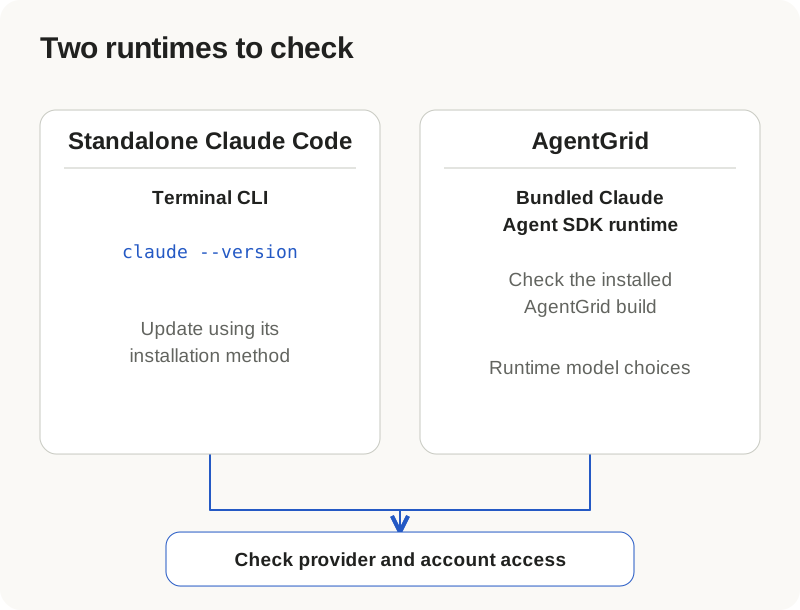
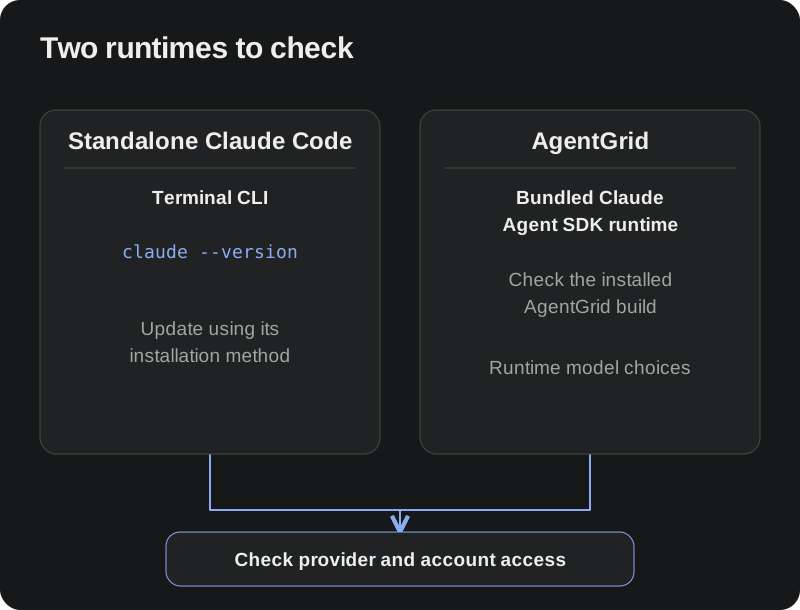
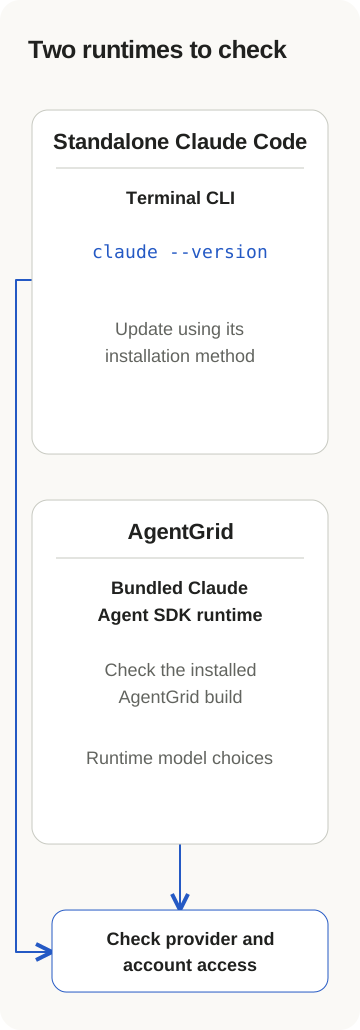
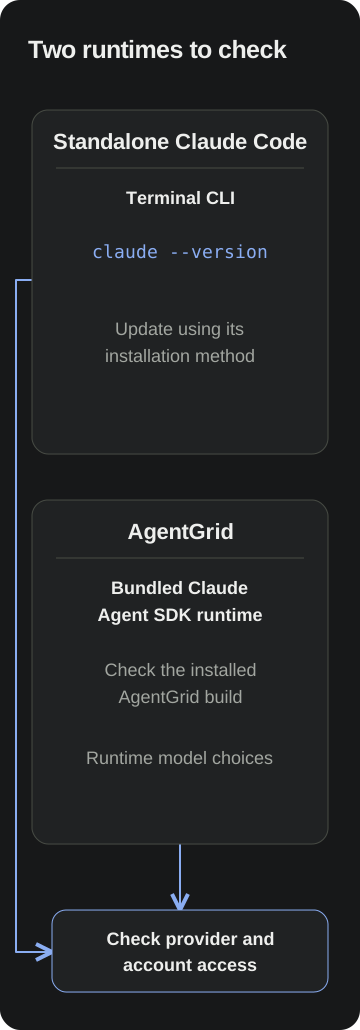
First, check which Claude you are updating
Claude Code needs version 2.1.280 or later for Opus 5.5. Select the explicit model ID, claude-opus-5-5, rather than relying on what an alias resolves to on your provider. Anthropic documents both requirements in model configuration.
For an existing standalone Claude Code installation, start in a terminal:
claude --version
claude doctor
If the version is too old, update using your installation method. Native installations support claude update; Homebrew users can run brew upgrade claude-code for that cask, and WinGet users can run winget upgrade Anthropic.ClaudeCode. Restart Claude afterward and check its version again. Package-manager releases can arrive later than the update notification. Follow the installation-specific instructions if your setup differs.
Then launch a standalone session explicitly:
claude --model claude-opus-5-5 --effort mediumWithin Claude Code, /model and /effort let you inspect or change those selections. Opus 5.5 supports low, medium, high, xhigh, and max. Organization policies can restrict your choices; successful installation alone does not establish model access. See model and effort controls.
Sign-in is a separate check. Claude Code supports subscription, Console, and supported cloud-provider authentication paths. Use the route your account or organization supplies; you do not need to create an API key just to follow a subscription-login workflow. AgentGrid does not replace that provider relationship. Authentication documentation explains the options.
There is one easy trap inside a desktop app: updating the standalone claude executable does not necessarily update the runtime bundled with AgentGrid. The terminal's version proves only what that terminal invokes. If the terminal has Opus 5.5 but AgentGrid does not offer it, check the AgentGrid build and its Claude configuration too. Repeatedly updating the terminal CLI may be fixing the wrong installation.
Set up the AgentGrid lead and builder deliberately
In AgentGrid, open Settings → Agents and complete Claude Code installation or sign-in as needed. Create a space, set its project folder to your repository, and open a Claude Code pane from the spawn menu. Use this pane as the lead. The Claude Code and Codex guide walks through the project setup.
Open the lead's model control and select Opus 5.5 under Claude Code if your runtime offers it. Select medium explicitly for your first scoped task. AgentGrid discovers runtime choices through the SDK; its separate orchestration catalog lists Opus 5.5 and all five effort levels. Neither list guarantees a successful request on your account. For a worker pane, the controls are labeled Choose model for next turn and Choose effort for next turn. A pending selection concerns the next turn, not an earlier result.
Also specify the builder's model when delegating. Selecting Opus in the lead does not mean every worker is necessarily running that exact model and effort. Ask the lead to launch the Claude builder with model="claude-opus-5-5" and effort="medium", then report the worker and working directory. If the requested combination is unavailable, have it explain the failure instead of silently substituting. The orchestration guide covers worker selection and reuse.
Keep the first change small enough to inspect. A pagination defect, a retry bug with a reproduction, or one component's keyboard behavior gives you a clearer result than asking for a general cleanup of an unfamiliar repository. Save the starting revision and identify the existing test command before implementation begins.
These steps are based on current AgentGrid code and guides; availability can differ by installed build and account. If setup stalls, separate the symptoms: a missing picker choice calls for checking the app/runtime; a rejected request needs the exact access or provider error; a missing worker needs its installation or sign-in checked. Ask the lead to report the failure and stop that attempt. Do not infer success from a selected label or replace credentials blindly.
Choose effort by the job, then check the difference
Opus 5.5 defaults to medium. Effort influences reasoning and token use; it is not a fixed time allowance or token cap. Adaptive thinking remains on, so turning thinking off is not the way to make this model economical. Anthropic recommends evaluating effort on your own tasks rather than carrying settings over unchanged from older models. Effort documentation.
My suggested starting points are practical choices to evaluate, not measured AgentGrid results:
| Work you need done | Starting choice | What to inspect |
|---|---|---|
| A narrow implementation with clear tests | Medium | Correct behavior, unnecessary changes, actual test output |
| An elusive defect or design tradeoff | High | Competing explanations and evidence for rejecting them |
| A difficult problem still unresolved after a good investigation | Try xhigh or max | Whether additional reasoning changes the useful result |
| A short mechanical task | Consider low | Whether speed comes at the expense of missed requirements |
Keep the task and acceptance criteria stable when trying a different setting. Record elapsed time, useful findings, failed checks, and what you had to correct. A longer explanation is not a better fix. If the agent lacks a reproduction or cannot run the test environment, resolve that gap before interpreting another attempt as an effort comparison.
What other users are actually doing
Three early reports suggest useful experiments, with different strengths of evidence.
Reviewing real defect patterns. CodeRabbit's Hendrik Krack and Gowtham Kishore Vijay describe testing their review pipeline on 80 shared open-source bug patterns and 13 harder Signal cases. Their Standard configuration caught 11 issues its baseline missed, but missed nine the baseline caught. Standard and Max combine settings across a pipeline; they are not individual Anthropic effort values. The lesson is to examine changed misses, not just the headline score. Their tests do not establish that combining two reviewers improves results. CodeRabbit's firsthand evaluation.
Checking generated code beyond presentation. Sonar's Prasenjit Sarkar reports a Java evaluation in which Opus 5.5 produced less code, while bug density and concurrency findings increased. The executable-test pass rate applies to a 544-task subset, not the entire collection used for static analysis. For your project, pair functional tests with the relevant quality checks; concise output alone cannot show correctness. Sonar sells code-analysis products, and this is its own evaluation, not an independent replication. Sonar's methodology and results.
Turning messy requirements into something usable. JayyRedd's AI Creators Roundtable post reports three small tests, including converting client notes into a brief. The notes contained conflicting scope and budget information and an approval bottleneck; both models identified the planted problems. The author provides a test-kit link and says each prompt ran once per model. Treat this as a named practitioner's anecdote with inspectable materials, not a controlled general benchmark. The useful exercise is asking Claude to surface contradictions before building. The first-person account.
Anthropic's launch page offers a different kind of evidence: vendor-selected testimonials. Ramp's John Ruelas describes design-spec and test-suite work; Stripe's Cristian Rivera describes coordinating a difficult stacked-PR rebase. Those accounts identify plausible tasks to try. They do not establish typical outcomes, and they are not results we reproduced in AgentGrid. Anthropic's customer accounts.
Give context a specific job
Put stable project instructions in CLAUDE.md: how to run checks, where important components live, and conventions an unfamiliar contributor would otherwise miss. Keep it concise and current. Claude reads it as context; prose instructions are not an enforced permission boundary. Claude Code memory guidance.
For the individual task, supply the failing behavior, expected behavior, relevant files, and constraints. For a retry defect, say whether duplicate submissions must be idempotent and whether cancellation should stop retries. Ask for evidence at those boundaries. Anthropic's best-practices guide recommends runnable verification criteria and inspecting actual evidence rather than accepting an assertion of success.
A skill earns its place when you repeat a procedure: your release checklist, API conventions, or accessibility review. Claude Code skills live in SKILL.md files and can include supporting resources. For a procedure you want to invoke yourself, disable-model-invocation: true prevents automatic invocation. Read a skill's instructions before adopting it; a collection of unrelated skills adds little to a narrow bug fix. Skills documentation.
MCP earns its place when the task needs information or actions outside the repository. An issue tracker connection could supply the reproduction that the code lacks. Check the required connection rather than adding every available service. Claude Code's /mcp panel exposes server state, including connections needing approval or authentication. AgentGrid supplies its own orchestration tools for coordinating visible workers; that is distinct from an external business-data connector. Claude Code MCP and AgentGrid integrations.
A complete prompt for build, review, fix, and verify
This is a proposed workflow prompt, not a transcript of a completed run. Paste it into the Claude lead after opening your project; it waits for your actual task rather than inventing work:
Coordinate one scoped change in this project using AgentGrid.

Read the repository instructions and relevant code. Preserve unrelated
local changes. Identify the existing checks and the starting revision.
If I have not supplied a task, ask what change I want and wait.
Turn my answer into explicit acceptance criteria before implementation.

Check available harnesses and access. Create or resolve a dedicated
worktree. Launch a visible Claude Code builder with
model="claude-opus-5-5" and effort="medium" in that worktree.
Report a setup failure instead of silently changing model or provider.

Have the builder implement the bounded change and run meaningful checks.
Require changed files, exact commands, actual results, and remaining limits.
Wait for the builder to finish before starting review.

Use a separate visible reviewer conversation in the same worktree.
Use Codex if installed and authenticated; otherwise ask which available
reviewer I want. Give it the original criteria, starting revision and
complete current diff, including untracked files. It may run checks but
must not edit. Ask for concrete failures, file references, and expected
versus actual behavior. A clean review is valid; do not invent findings.

Send actionable findings to the same builder. Wait for the fix, then have
the same reviewer recheck the revised files and original criteria.
For a UI change, inspect the real running interface as well as tests.
Finish with the final revision, checks that actually ran, unresolved risks,
and what I should inspect. Do not merge, publish or deploy without my approval.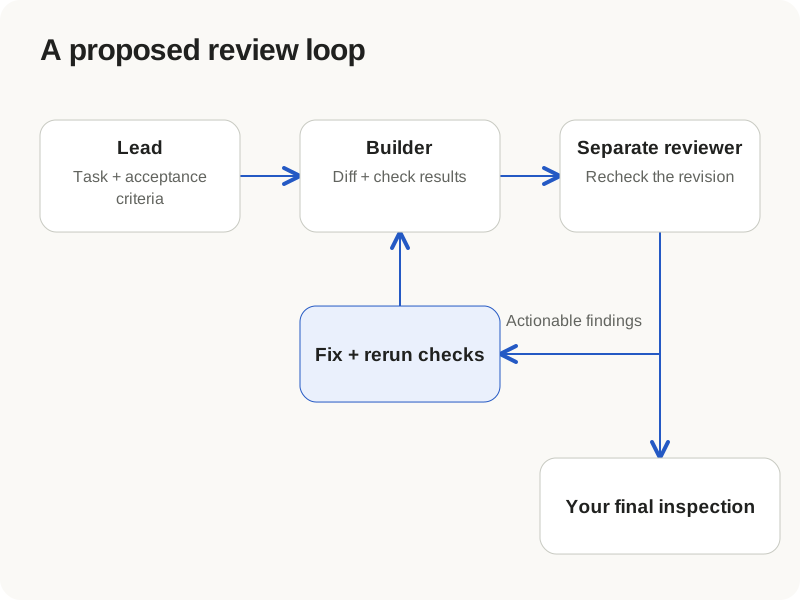
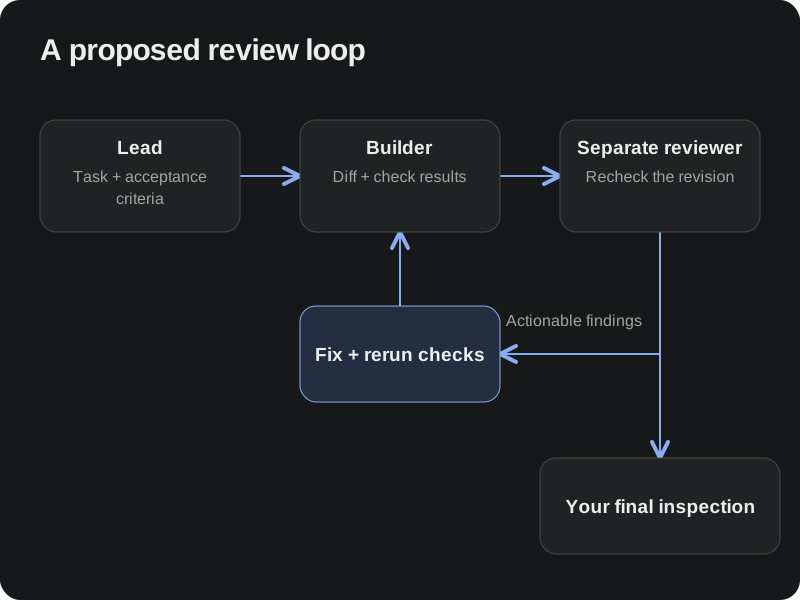
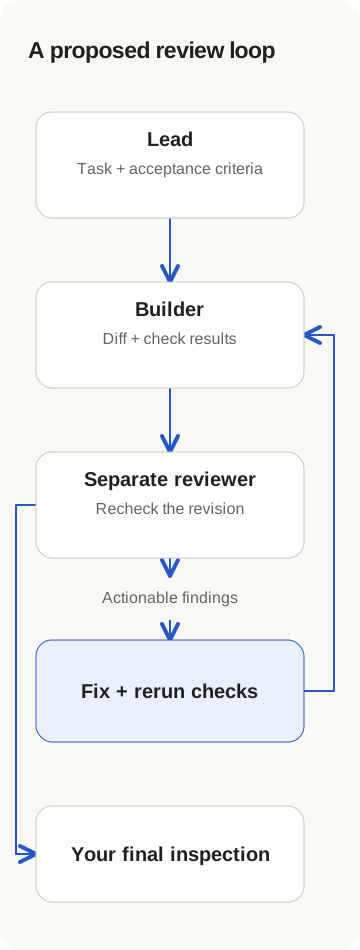
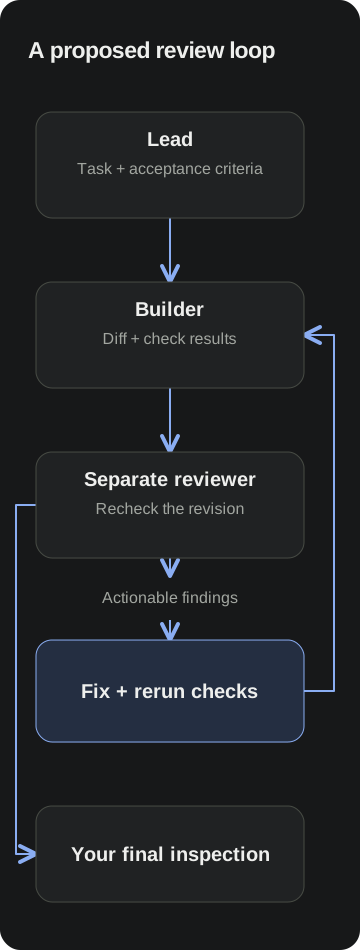
Separate review means a fresh conversation assessing the requirements. Both workers can still access the same files; the request not to edit is not filesystem isolation. Likewise, using another model is an evaluation choice, not a guarantee that it will catch the builder's mistakes.
When a finding arrives, ask for a reproducible input and the expected result. Send that evidence back to the existing builder. After the fix, rerun the relevant check on the revised code. A green result from before the final edit does not validate the final revision. For a user-interface change, try the affected interaction yourself; a screenshot of the right layout cannot prove that keyboard navigation works.
Try it on one change you already need
Choose a small bug or feature whose success you can describe before Claude starts. Use Opus 5.5 at medium, inspect the builder's evidence, and let a separate reviewer challenge the result. Adjust effort when you can name what the first attempt missed.
The build-and-review workflow provides the reusable team pattern; the Claude Code and Codex exercise gives you a concrete practice bug. If your real decision is between models, see Opus 5.5 vs. Fable 5.1.
Download AgentGrid to put the lead, builder, review conversation, and test terminal beside the project you are improving. Start with one inspectable change and keep the evidence that tells you whether the setup helped.