Claude Code Plan Mode: When to Plan, When to Build, and When to Add a Reviewer
Use uncertainty and consequence to decide when to plan, build directly, or add a reviewer. Includes proposed prompts and an evidence handoff.
 AgentGrid
In this story
AI-drafted for AgentGrid, which makes the agent workspace discussed below. Documentation checked September 26, 2026. The prompts and diagrams propose a workflow; they are not a benchmark or a report of an executed session.
Use Claude Code Plan Mode when you need to settle a consequential decision before implementation. Build directly when the intended change is clear and easy to check. Add a separate reviewer when a plausible mistake could survive your own inspection or the existing tests.
The difficult part is deciding how much process a task deserves. A long plan can consume the attention you needed for the diff. Another agent adds another handoff to check. Neither earns its place simply because the tools make it easy to start.
Ayman Nadeem's September 24 essay, “Plan mode is dead”, describes lessons from building Nuanced: lengthy generated specifications and a rigid separation between planning and building did not deliver the clarity intended. The account raises a useful question: what information helps a person stay oriented as code changes?
A Claude Code community discussion asks the practical version: when do planning frameworks and parallel agents repay their review and coordination overhead? That is a workflow question, not evidence that one method wins everywhere.
What Plan Mode does
Claude Code's common-workflows documentation presents Plan Mode as a way to explore and propose changes before implementation. Start in Plan Mode from the terminal.
claude --permission-mode planDuring a session, cycle modes with Shift+Tab and check the status bar. The detailed permission-mode documentation also documents /plan for a single prompt. When Claude presents a plan, you can request revisions or approve it and move into the selected execution mode.
Plan Mode is not a universal read-only sandbox. It can run exploratory shell commands, whose handling depends on session settings. The docs specifically say interactive terminal sessions with bypass permissions available do not enforce Plan Mode's blocks. Check your session configuration before relying on the mode to prevent changes.
Anthropic's best-practices guide recommends planning for uncertainty or unfamiliar code and direct implementation for small, clear changes. Our suggested extension is to consider the consequence of being wrong as well as task size.
Choose by uncertainty and consequence
These are editorial starting points. Your repository's required reviews still apply.
| Task situation | Start here | What earns more process |
|---|---|---|
| A wording fix with a known location | Build directly; inspect the diff and affected view | Unexpected behavior or wider scope |
| A reproducible bug in familiar code | Investigate briefly, then implement one fix | Several plausible causes or unclear expected behavior |
| A feature with unsettled product behavior | Plan the decisions and acceptance criteria | A choice that changes the API, data model, or user experience |
| A small change to access control or data deletion | Plan first; arrange focused independent review | Consequences that a happy-path test cannot settle |
| An unfamiliar change across components | Map dependencies; choose one testable slice | Hidden coupling, migration risk, or missing checks |
A one-line permission change may deserve more scrutiny than a large mechanical rename. Ask what you would have to undo if the assumption were wrong, and whether your checks would notice.
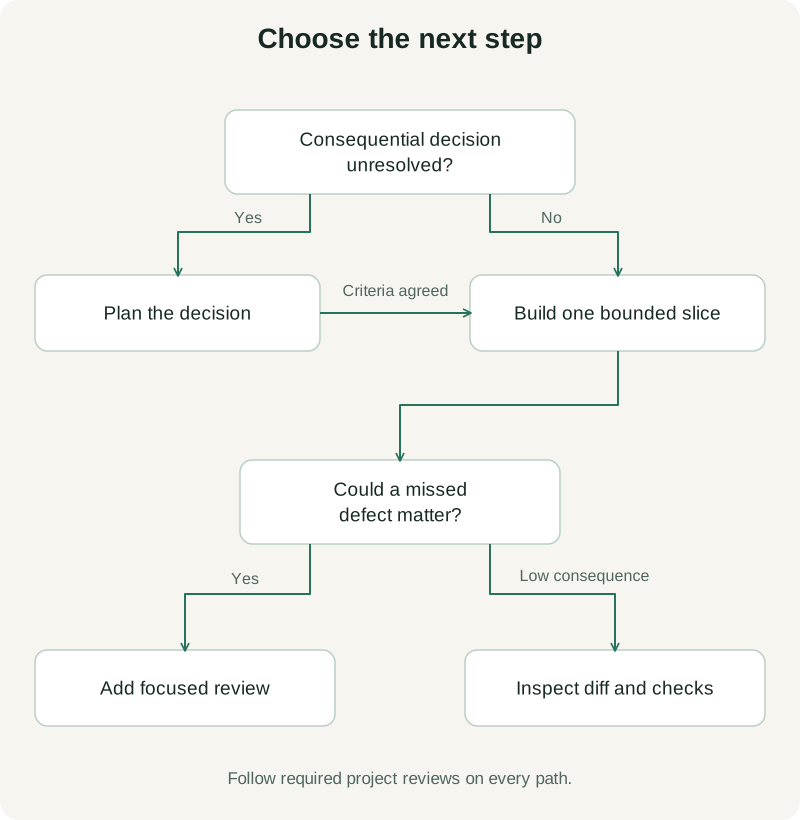
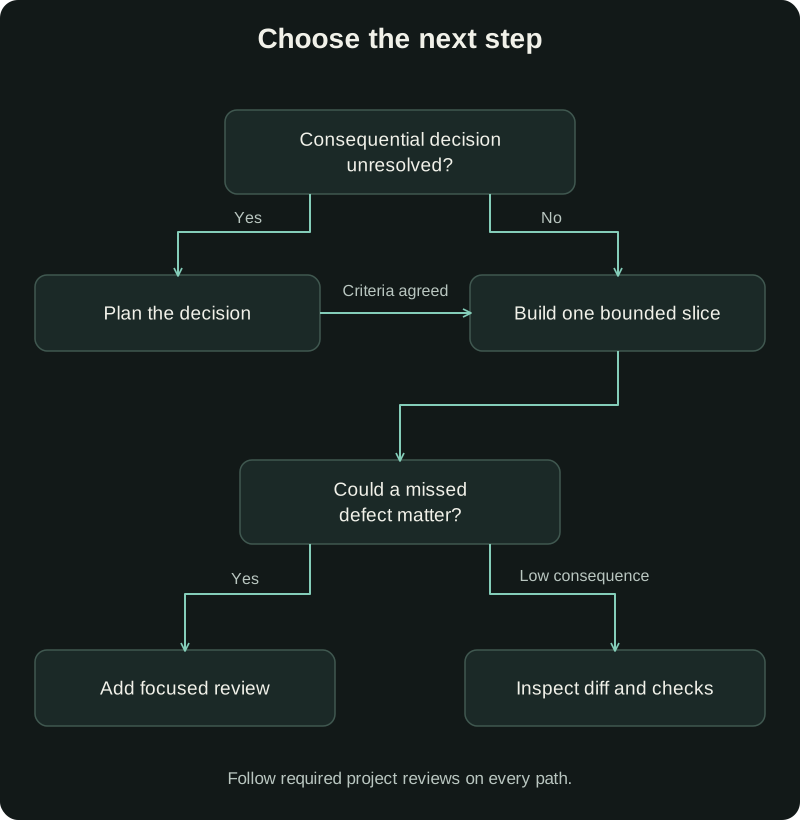
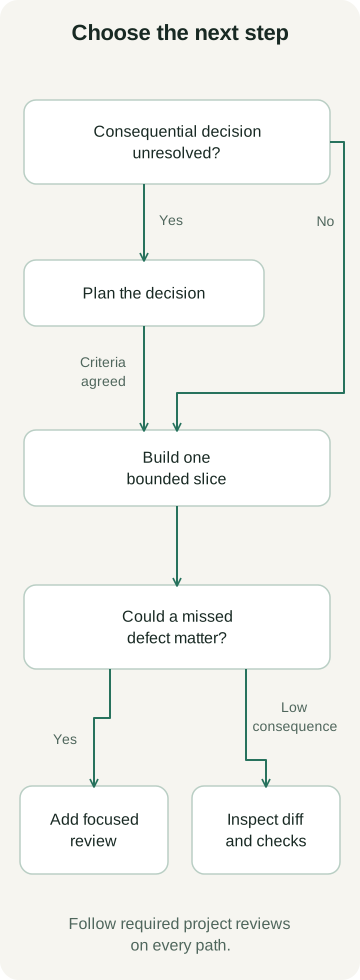
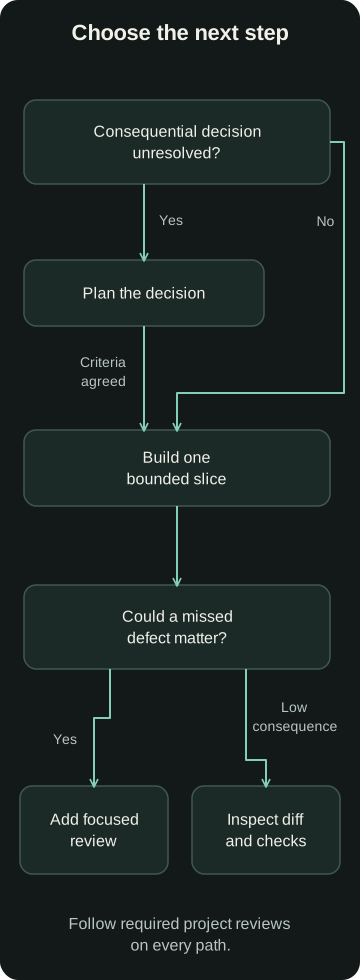
Stop planning when you can check the next change
A useful plan names the unresolved decision, the evidence needed to settle it, and the next change that will test the answer. It need not predict every edit.
Consider a hypothetical search page where changing filters sometimes leaves the user on an empty results page. Before implementation, settle whether changing a filter should reset pagination. That product decision matters more than a detailed list of helper functions.
Here is an original prompt to adapt in Plan Mode:
Investigate the filter/pagination behavior without implementing yet.
Find the relevant state transitions and existing tests.
Propose the smallest fix for this expected behavior:
changing any filter resets the page to 1; changing pages preserves filters.
Identify unresolved decisions, likely affected files, and meaningful checks.
Keep the plan short enough to review in one sitting.
Stop when we can agree on one testable implementation slice.
Acceptance criteria could be three sentences: changing a filter resets the page; selecting page two keeps the filters; clearing filters restores the default results on page one. Add relevant constraints, such as preserving shareable URLs, only if the product requires them.
Review those criteria yourself. A model can propose internally consistent behavior that is wrong for your users. If you cannot decide between two behaviors, another implementation paragraph will not make that decision for you.
Build a slice that can change your mind
Once the behavior is agreed, implement the filter/page transition and its relevant checks. Leave unrelated search redesigns for another task. A bounded change gives you something concrete to inspect before extending the approach.
Proposed implementation prompt:
Implement the agreed filter/page behavior only.
Preserve unrelated local changes and follow the repository instructions.
Run the relevant existing checks and add coverage for the changed behavior.
If the fix needs an API or persistence change, stop and explain the decision.
Return the diff, exact commands and outcomes, and anything you could not verify.
If implementation exposes a false assumption, revise the affected decision and criteria. There is no benefit in preserving a plan that the code has disproved. Avoid regenerating the whole document when one assumption changed.
Give a reviewer evidence and a specific question
Add a reviewer when you can name a worthwhile challenge: could an older search response overwrite newer results, could a URL restore the wrong page, or could the change affect another caller? Review can be useful even when the plan was short.
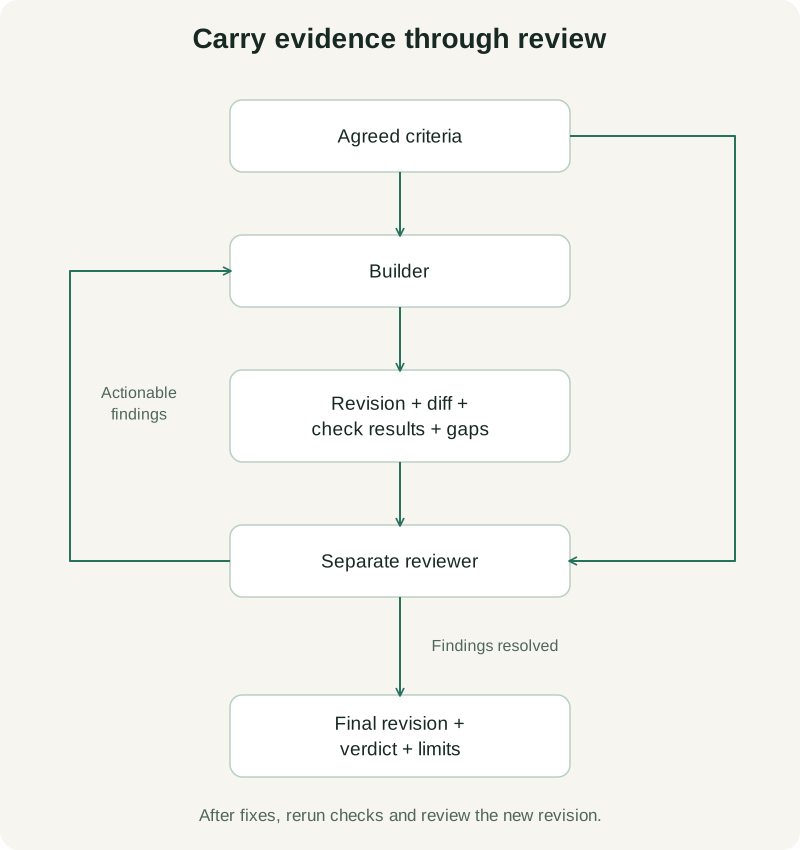
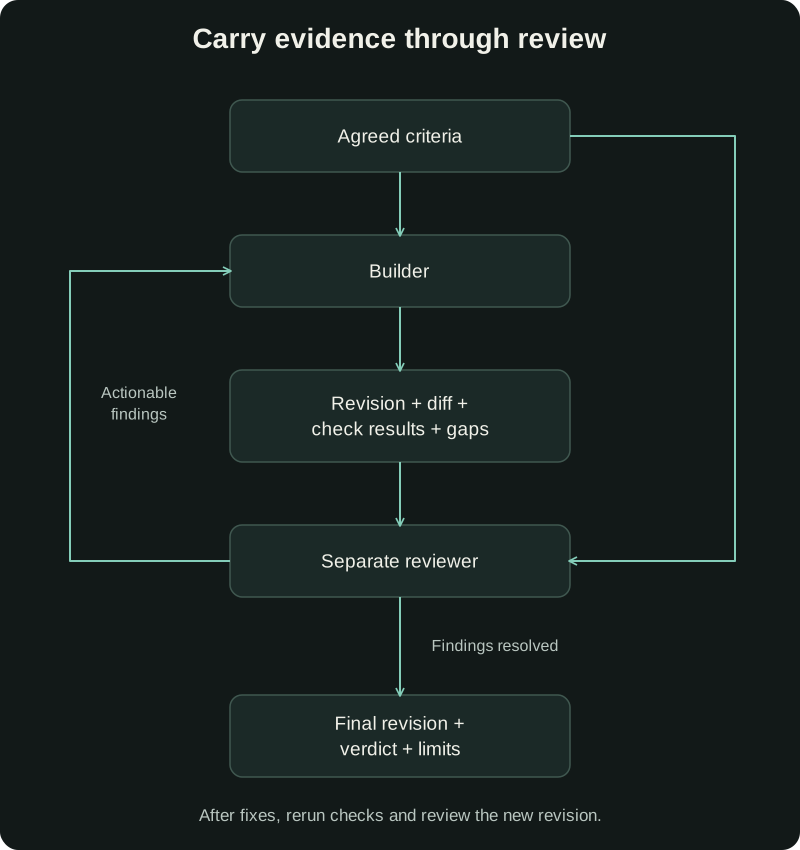
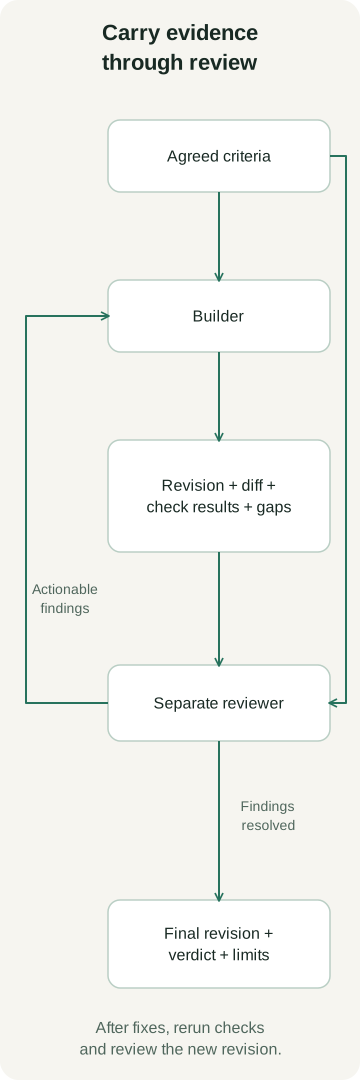
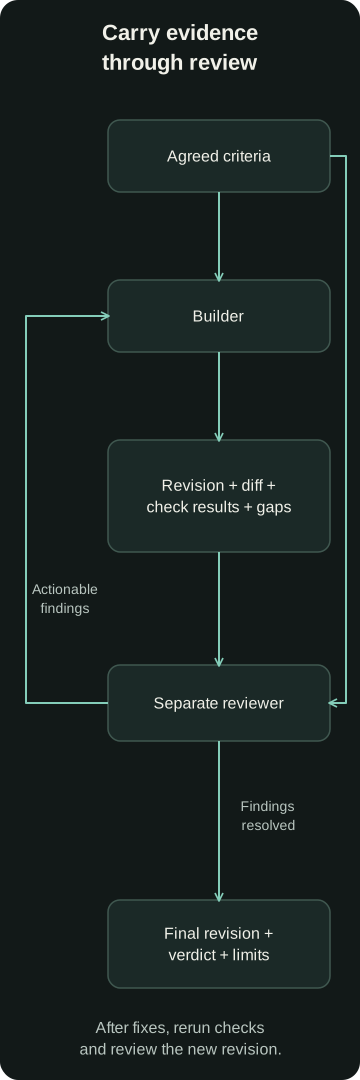
Give the reviewer the original criteria, base and current revisions, full diff including relevant untracked files, exact check results, and known gaps. Ask for a reproduction or code-based explanation of each finding. A separate conversation can challenge the builder's reasoning; it does not guarantee different assumptions or a correct verdict.
If the question is whether the chosen behavior is right, review the criteria before building. If it is whether the code satisfies them, review the implementation. More reviewers are not a substitute for choosing the right question.
A passing test is evidence about what it exercised. A test that never changes filters cannot establish that pagination resets. Ask the reviewer to identify the missing scenario rather than request “more tests” in general. For interface behavior, try the actual interaction as well.
After a fix, rerun the relevant checks and review the revised code. Stop the loop when the criteria have supporting evidence and material findings are resolved, or when a specific unresolved decision needs your attention. Report blocked checks plainly.
Keep the handoff visible in AgentGrid
AgentGrid supports visible agent and terminal panes. Its build-and-review workflow sets up a builder and a reviewer in separate conversations, with findings returned to the builder. Use that fuller setup when the task warrants coordination; a straightforward fix may need only one working conversation and your inspection.
Those separate conversations can still access the same files. Asking a reviewer not to edit is an instruction, not a filesystem boundary. The workflow's value depends on supplying and inspecting evidence; placing panes beside each other does not automatically trace requirements to correct behavior.
Download AgentGrid if you want the builder, review conversation, and test terminal together for your next consequential change. Start with one bounded slice and one review question you can actually answer.