Claude Code Mods: What They Are and How to Get Started
Make one recurring part of your coding session easier to see or control, then decide whether the customization earns its place.
 AgentGrid
Conceptual motion, 37 seconds. Not a recorded Claude Code session, and not an AgentGrid product demo.
Read the transcriptIn this story
Prepared by AgentGrid with AI assistance. Documentation checked October 6, 2026. This article describes a proposed setup; the Mods example has not been run in AgentGrid.
The most useful customization is often the one that removes a question you ask ten times a day: Which branch am I on? What did the agent just change? Is this command about to touch more than I intended?
Claude Code mods let developers change the agent's behavior and interface using JavaScript or TypeScript handlers. A mod can add a pane or command, observe events, or intervene in a tool call. Anthropic documents terminal support from Claude Code 2.1.287. That makes mods worth exploring if the missing piece is part of the coding session itself. Mods overview
Start with a small problem you can recognize when it is solved. Installing a collection of extensions before deciding what you need makes it harder to tell which one helped, which one broke, and which one you would actually miss.
Choose the smallest useful customization
A reader who keeps repeating a review checklist has a different problem from one who wants an interactive panel beside the conversation.
| Your recurring need | Start by considering |
|---|---|
| Reuse instructions for a particular task | A skill |
| Run an existing check when an event happens | A settings hook |
| Give the agent access to another system's tools | An MCP server |
| Change the interface or intercept session behavior | A mod |
These tools can coexist inside a plugin. The distinction is what you want the customization to do, rather than how impressive its installation looks. Anthropic provides a direct comparison of the four approaches. Compare customization options
For a first experiment, choose visibility over automatic intervention. A branch display or tool-call counter gives you an obvious result to inspect. An extension that rewrites prompts or approves actions needs a more demanding evaluation because a neat interface would tell you little about its behavior.
Make your first experiment easy to judge
Anthropic uses a current-branch display as an example request in its creation guide. Our proposed exercise adds explicit acceptance criteria: the displayed branch should match the repository, and outside a repository it should report an unavailable state instead of showing an old value. Detached HEAD and branch changes below are requirements we propose testing, not documented results from a completed run.
Anthropic's creation guide supports asking Claude to write a mod and checking it in /plugin's Installed tab. Session-created files live under ~/.claude/dev-mods/<session-id>/ and are subject to session cleanup. To keep one, copy its directory elsewhere and load it explicitly with --plugin-dir, or package it for a marketplace. The session's approval dialog still controls hot reloading. Create a mod
Here is a proposed brief to adapt:
Build a small Claude Code mod that displays the current Git branch.

Before writing it, explain which events and APIs you will use and which
files you intend to create. Do not change this repository's files,
make network requests, approve tool calls, or rewrite my prompts.

Handle a directory that is not a Git repository, a detached HEAD,
and a branch change during the session. Show an explicit unavailable
state when you cannot determine the branch; do not retain a stale label.

Give me a short way to verify each case and disable the mod.
Wait for me to review the implementation before loading it.
This prompt is a specification, not a security boundary. The generated implementation still needs inspection. The interesting outcome is whether a modest display removes a repeated check without introducing misleading information.
Inspect before installing
A plugin's popularity is not a review of the code you are about to run. Check its source, the revision you selected, its requested behavior, and who maintains it. Mods are not sandboxed: they run with your permissions and can access files and secrets, make network requests, consume model usage and approve tool calls. A request in your prompt does not restrict those capabilities. Plugin security and trust
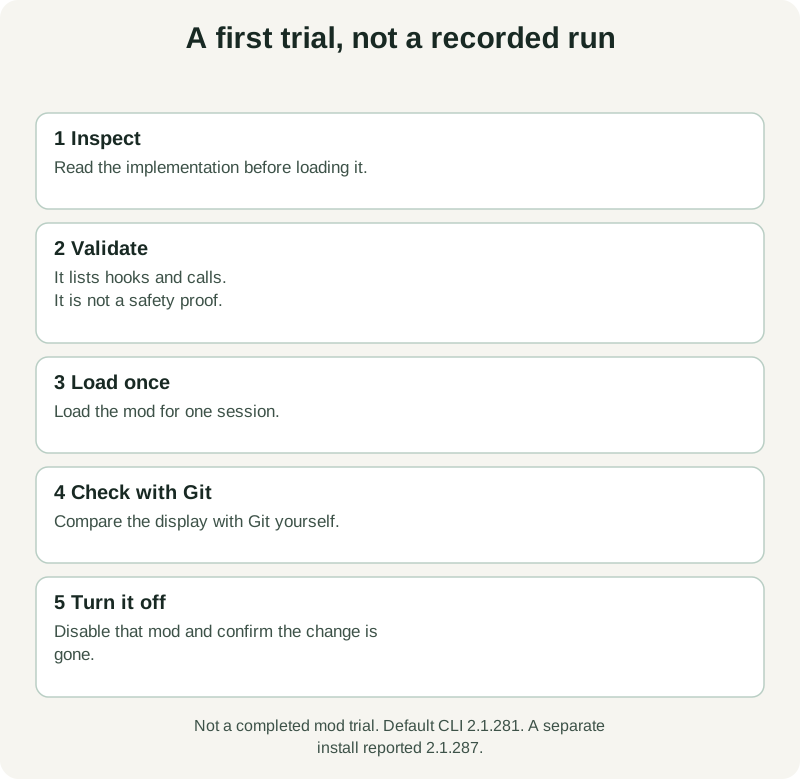
For a directory you have already obtained and inspected, the current documentation describes validation and one-session loading. Use a supported terminal CLI, version 2.1.287 or later. Our default CLI reported 2.1.281; a separate installation reported 2.1.287 and exposed the plugin commands. That version check is not a completed mod trial. The commands below are the documented next steps for a mod you have inspected:
claude plugin validate ./my-mod
claude --plugin-dir ./my-mod
Replace ./my-mod with your actual directory. Validation lists declared hooks and calls without running the mod; it is not a safety proof. Disable an individual installed plugin from /plugin → Installed. After a shell installation into an already-open session, use /reload-plugins. Follow the documented installation scope for continued use. Install and manage plugins
Keep the first trial in a disposable project. Compare the result with an independent check, then turn the mod off and verify that the original behavior returns. That last step is part of the experiment: a customization should have a clear exit.
Use the right surface inside AgentGrid
AgentGrid provides terminal panes that run your shell in the project's directory. That is a useful place to keep a Claude Code experiment beside its files and verification commands. AgentGrid terminals
Check the executable in the terminal you will actually use:
claude --versionDo not assume that updating a standalone CLI updates an embedded runtime too. Anthropic distinguishes interactive terminals, where mod interfaces can draw, from Agent SDK sessions, where those interfaces do not appear. Running Claude through a graphical agent integration is therefore a different claim from running the interactive CLI in a terminal pane. Supported surfaces
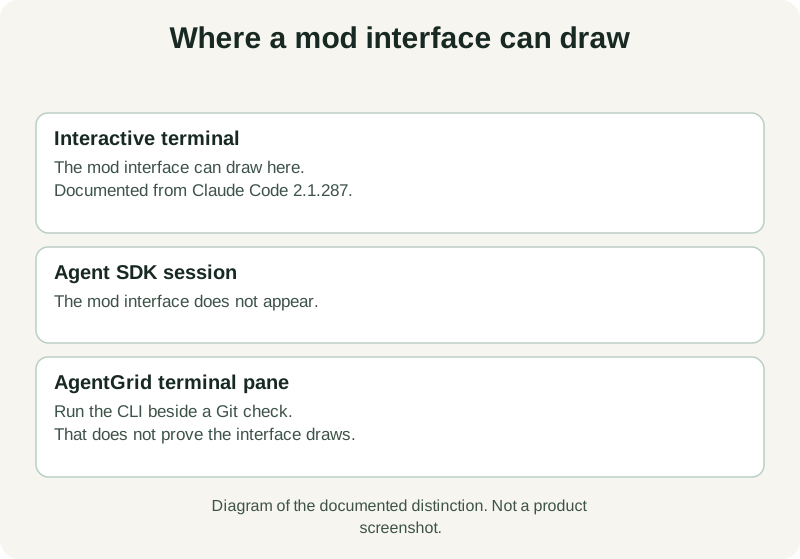
For a future run of the branch-display exercise, keep a second terminal available for git branch --show-current and git status. Use it to check the display instead of asking the same session whether its own mod works. Record the runtime version and the checks for the initial branch, changed branch and unavailable state, including any failures. None of those results is established here.
Keep what changes your work
After a few sessions, ask whether you stopped doing something repetitive, caught a mistake earlier, or made a decision with better information. Remove the extension if its main effect is adding another moving part to watch.
If you want a workspace for trying that experiment alongside its verification, download AgentGrid and open a disposable project. Start with one mod, one observable result, and a way to check it.