Run your coding agents in one visual workspace.
Orchestrate Claude Code, Codex, Cursor, and six more harnesses. They all talk to each other. Bring your own subscription. No second meter.


Works with the subscriptions you already have
macOS · Windows · Linux
Community feedback
 Steve Witmer
 Oleg Bilozor
 Isaiah Centifanto
 Nathan Bertram
 Daniel Mathews
 Koda
Koda5,000+ AI builders
“I can't even tell you how big of a deal AgentGrid has been for me! Thank you for making it”
“Met the AgentGrid guys a few days ago—loving it so far.”
Product demo.
See AgentGrid in action.
One visual workspace per project. Pan, zoom, arrange, and launch agents.
- Create spaces with ⌘T
- Launch agents with ⌘1–9
- Search with ⌘F
- Navigate with the minimap and undo close
Restart without losing your work.
Everything reopens.
After an OS update or restart, reopen AgentGrid without worrying about lost sessions.
- Save sessions to disk in .agent-grid
- Keep work through updates and restarts
- Resume agents mid-task
See your AI usage.
Limits and reset times.
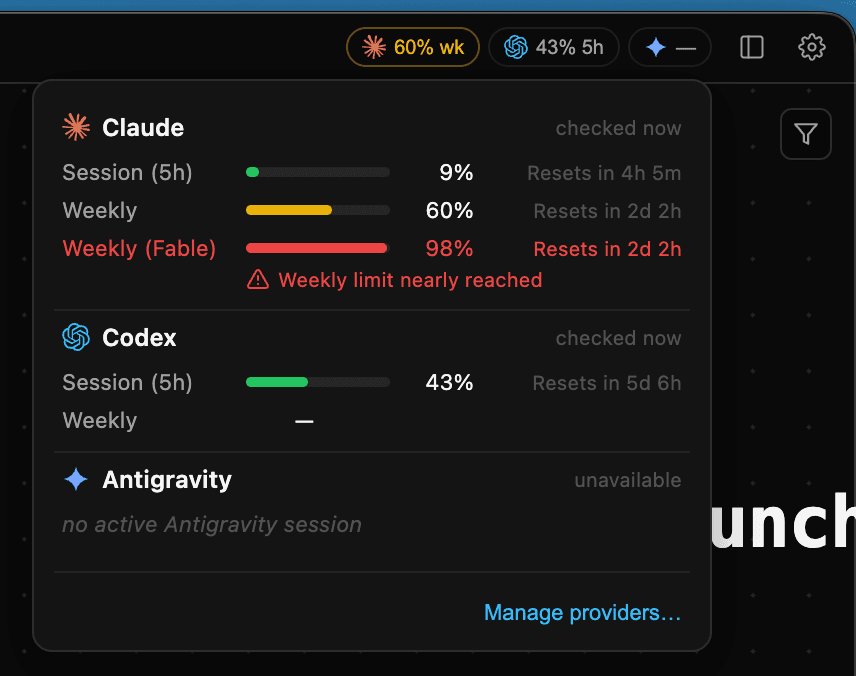
See provider limits, reset times, and low-usage warnings in one place.
- See each provider's current limit
- Know when a usage window resets
- Get a warning before work is interrupted
Hit a limit?
Switch agents. Keep going.
When Claude or another provider reaches a usage or session limit, open another agent in the same project, show it the visible work, and continue.
- See the provider limit before work stops
- Open another agent in the same project
- Ask it to review the visible work and continue
plan.md
Landing page hierarchy
Hero, proof, and responsive CTA states.
Usage warning · 96%
Claude session limit is almost reached.
You type
You’re taking over this session from Claude. Review the work so far, then continue.
Codex
Reviewed plan.md and hero diff
Continuing: responsive CTA states.
Your message starts the handoff
Agents can see the whole workspace.
Not just their own chat.
Agents can read notes, terminal output, and other panes in the workspace.
- Read notes and plans
- See terminal output
- Use context from other panes
- Hand off without copy-paste
Run any supported harness
side by side.
Choose from nine supported coding harnesses and keep every agent in one visual workspace.
- Choose the best harness for each task
- Run different harnesses side by side
- Switch harnesses without leaving the project
Delegate work.
Keep every worker visible.
Ask a master agent to split the work, read full worker conversations, and send follow-ups when needed.
- See every worker on the canvas
- Read the full worker conversation
- Send follow-ups directly
implement
24 files
test
24 passed
review
ship it
Plan. Implement. Review.
Your software factory, visible.
Move work through a clear loop: make a plan, delegate implementation, then inspect the diff and decide what happens next.
- Plan work in a note or master conversation
- Delegate implementation to visible workers
- Review results, approve, or send a follow-up
Plan
activeplan.md
Landing page hierarchy
✓ Plan ready
Implement
activeworker · builder
Hero and CTA updated
✓ Diff ready
Review
activeworker · review
24 files changed
✓ Ready to inspect
Human review
Approve the result or send a follow-up.
Use your dev tools beside
your agents.
Use terminal, VS Code, git, and Chromium with DevTools beside the agent working on your task.
- Run commands in a real terminal
- Open VS Code beside your agent
- Stage, diff, and commit with git
- Chromium with DevTools
Call your agents.
Talk through the work.
Start a live call from an agent pane and continue the same development conversation while the agent works.
- Start a live call from an agent pane
- Keep the same conversation and context
- Hand off the next task during the call
Landing page redesign
Earlier: simplify the story above the fold and make the primary action easier to find.
Earlier context
You
Ok, let’s talk about redesigning the landing page.
Master
I’m looking at the hero and primary CTA.
Master
Connected
You · Prioritize the hero hierarchy.
Master · I’ll tighten the CTA.
Continue on desktop or mobile.
Same project. Same layout.
Open the same project and canvas on desktop, iPhone, or Android.
- Open shared projects on desktop, iPhone, and Android
- Keep the same canvas layout on every device
Desktop
Mobile beta
Changelog
Multi-window support — open your workspace across several windows, tear tabs out into their own, and drag them back. Panes keep running through the move.
Closing a project tab and reopening it no longer wipes your worker panes back to "start a session" — every worker comes back with its transcript intact and follow-ups resume the same conversation.
Every canvas note is backed by a .md file in your project's .agent-grid/notes/ folder — greppable, versionable, and editable by any tool. Drop a markdown file (even an empty one) onto the canvas and it becomes a note; write one into the folder and it appears.
The worker role card no longer renders a blank description when a master sends invisible characters, and an empty project system prompt is shown as "None" instead of being flagged as malformed.